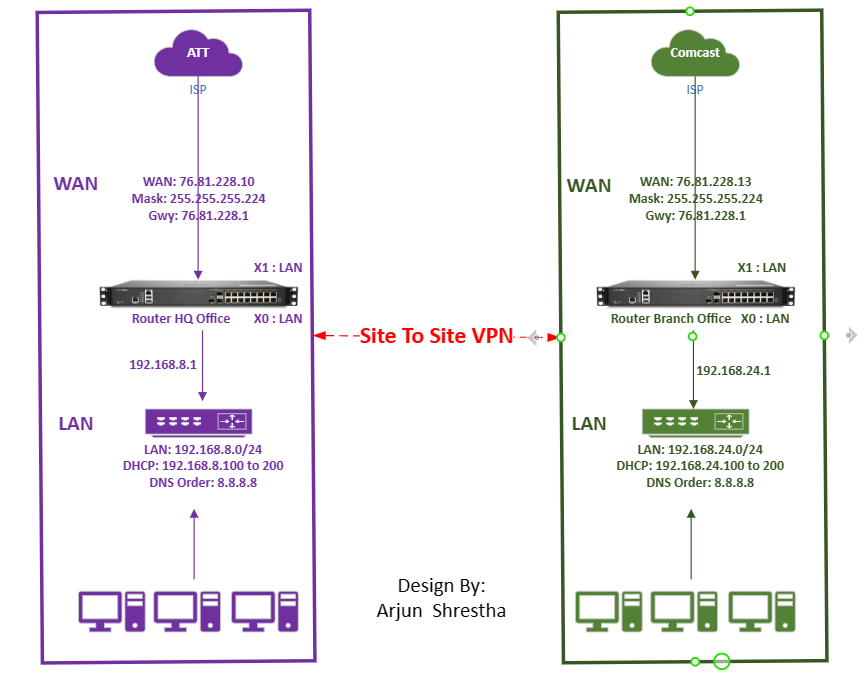
Site to Site VPN Configuration in SonicWall Router: Setting up a site-to-site VPN on a SonicWall router involves several steps. Keep in mind that the specific steps may vary based on the model and firmware version of your SonicWall router. Here's a general guide: We are going do site to site VPN in two group Group 8 and Group 24 ( left side is Group 8 and Right side is Group 24 ) See in the below diagram. Access the SonicWall Management Interface: Open a web browser and enter the IP address of your SonicWall router. Log in with your administrator credentials. Navigate to VPN Settings: Locate the VPN settings in the management interface. This is typically found in the "VPN" section. Click on Manage Click on VPN ( under connectivity ) > Click on Basic settings Now click on Add button Group 8 SonicWall Router configuration: Configure General tab : Provide Security Policy : Policy Type: Authentication Method Name: IPsec Primary Gateway Name or I...
How to reduce the size of your .OST file? An OST file, short for Offline Storage Table, is a data file used by Microsoft Outlook to enable users to work offline and synchronize changes with the Exchange server when a connection is reestablished. OST files store copies of mailbox items such as emails, contacts, calendar entries, tasks, and notes, allowing users to access and manage their Outlook data even without an internet connection. When Outlook is connected to an Exchange server, changes made in the OST file are synchronized with the server to ensure consistency across devices and environments. If OST file size is too big and want to reduce the .OST file size you should follow below steps: In Outlook, Click on File > Account Settings > Account setting > Data Files Click on 1 Data Files tab > 2 select the .ost file like above yellow color Click on 3 Settings options Click on 4 Advance tab Click on 5 “ Outlook Data File setting s” button Click on 6 Compac...
If a client legal team requested all email and share point files from the past 6 months to present some specific project, can you tell me what kind of tools that you use to deliver that request? If a client legal team requests all email and share point files from the past 6 months to present some specific project, can you tell me what kind of tools that you use to deliver that request? To fulfill a client's legal request for all emails and SharePoint files related to a specific project for the past 6 months, several tools and techniques can be employed. The choice of tools will depend on the organization's existing infrastructure, IT policies, and the scope of the request. Here are some common tools and approaches: eDiscovery Tools: Many organizations use enterprise-level eDiscovery tools, such as Microsoft Purview eDiscovery (previously Office 365 Advanced eDiscovery), Veritas eDiscovery Platform, Nuix, or Relativity, to search, collect, and export email and SharePoint data ...

Comments