How to reduce the size of your .OST file? An OST file, short for Offline Storage Table, is a data file used by Microsoft Outlook to enable users to work offline and synchronize changes with the Exchange server when a connection is reestablished. OST files store copies of mailbox items such as emails, contacts, calendar entries, tasks, and notes, allowing users to access and manage their Outlook data even without an internet connection. When Outlook is connected to an Exchange server, changes made in the OST file are synchronized with the server to ensure consistency across devices and environments. If OST file size is too big and want to reduce the .OST file size you should follow below steps: In Outlook, Click on File > Account Settings > Account setting > Data Files Click on 1 Data Files tab > 2 select the .ost file like above yellow color Click on 3 Settings options Click on 4 Advance tab Click on 5 “ Outlook Data File setting s” button Click on 6 Compac...
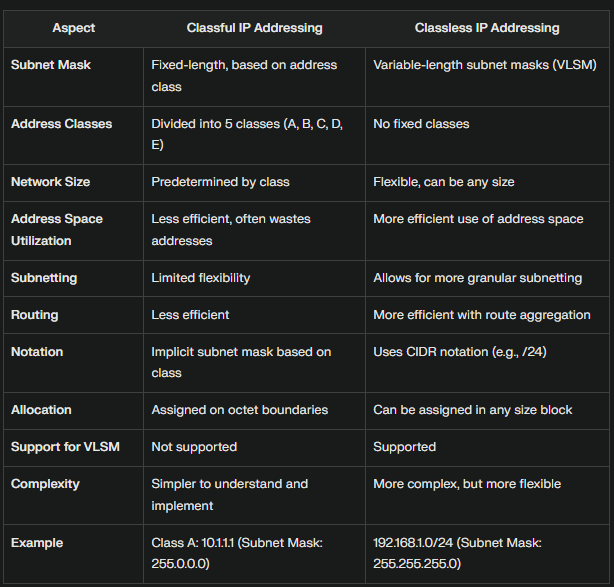
What are the differences between Classful IP address and Classless IP Address? Examples Classful Addressing: Class A: IP Range: 1.0.0.0 to 126.255.255.255, Example: 10.1.1.1, Subnet Mask: 255.0.0.0 Class B: IP Range: 128.0.0.0 to 191.255.255.255, Example: 172.16.0.1, Subnet Mask: 255.255.0.0 Class C: IP Range: 192.0.0.0 to 223.255.255.255, Example: 192.168.1.1, Subnet Mask: 255.255.255.0 Classless Addressing (CIDR): Example 1: 192.168.1.0/24, where /24 indicates the first 24 bits are the network portion, Subnet Mask: 255.255.255.0 Example 2: 10.0.0.0/8, where /8 indicates the first 8 bits are the network portion, Subnet Mask: 255.0.0.0 Example 3: 172.16.0.0/12, where /12 indicates the first 12 bits are the network portion, Subnet Mask: 255.240.0.0 Classful addressing divides IP addresses into fixed classes with predetermined ranges, leading to inefficiencies and wasted addresses. Classless addressing, or CIDR, allows for more flexible and efficient use of IP address space by usin...


Comments