Common Exchange Online server issues and solutions During interviews for Exchange Online administrator or support roles, some common Exchange Online server issues and solutions that may be asked include: Email Delivery Issues: Problem: Emails are not being delivered or received. Possible Solutions: Check mail flow rules, connectors, and transport services. Troubleshoot using message tracking and protocol logging. Verify DNS records and ensure no IP blocking or blacklisting. Mailbox Access Issues: Problem: Users cannot access their mailboxes or experience intermittent access. Possible Solutions: Check mailbox permissions, user account status, and client configurations. Diagnose using the Remote Connectivity Analyzer tool. Reset mailbox credentials or reconnect the mailbox if necessary. Outlook Performance Issues: Problem: Slow performance or responsiveness in Outlook or other Exchange Online clients. Possible Solutions: Investigate large mailboxes, outdated Outlook versions, and network...
SCCM Chrome Software Deployment: SCCM stands for System Center Configuration Manager. It's a comprehensive management solution for deploying, managing, and monitoring devices and applications within an organization's infrastructure. SCCM allows IT administrators to automate software installations, updates, and configurations across a large number of computers. To deploy Google Chrome using SCCM, you typically follow these steps: Obtain the Google Chrome MSI Installer: Download the MSI installer for Google Chrome from the official Google website or any trusted source. It's usually available as an enterprise installer. Create a Package in SCCM: Open the SCCM console and create a new package. This involves specifying the source location of the Chrome MSI installer and any additional customization files or scripts. Distribute the Package: Once the package is created, distribute it to distribution points in your SCCM infrastructure. This ensures that client computers ...
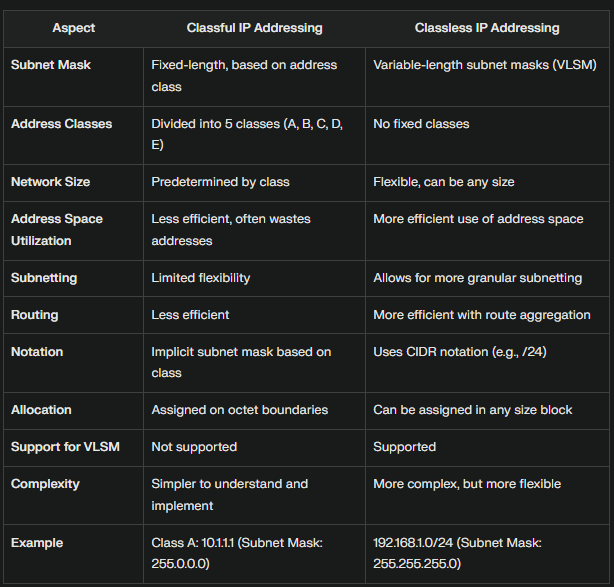
What are the differences between Classful IP address and Classless IP Address? Examples Classful Addressing: Class A: IP Range: 1.0.0.0 to 126.255.255.255, Example: 10.1.1.1, Subnet Mask: 255.0.0.0 Class B: IP Range: 128.0.0.0 to 191.255.255.255, Example: 172.16.0.1, Subnet Mask: 255.255.0.0 Class C: IP Range: 192.0.0.0 to 223.255.255.255, Example: 192.168.1.1, Subnet Mask: 255.255.255.0 Classless Addressing (CIDR): Example 1: 192.168.1.0/24, where /24 indicates the first 24 bits are the network portion, Subnet Mask: 255.255.255.0 Example 2: 10.0.0.0/8, where /8 indicates the first 8 bits are the network portion, Subnet Mask: 255.0.0.0 Example 3: 172.16.0.0/12, where /12 indicates the first 12 bits are the network portion, Subnet Mask: 255.240.0.0 Classful addressing divides IP addresses into fixed classes with predetermined ranges, leading to inefficiencies and wasted addresses. Classless addressing, or CIDR, allows for more flexible and efficient use of IP address space by usin...

Comments